loading…
en/
Browse all


 by Google
 by Slack
chigwell/telegram-mcp
FreeNot checkedTelegram API integration for accessing user data, managing dialogs (chats, channels, groups), retrieving messages, sending messages and handling read status.

About
Telegram API integration for accessing user data, managing dialogs (chats, channels, groups), retrieving messages, sending messages and handling read status.
README
License: Apache 2.0
Python Lint & Format Check
Docker Build & Compose Validation
A Telegram integration for Claude, Cursor, and other MCP-compatible clients. It exposes Telegram account, chat, message, contact, media, folder, and admin operations through the Model Context Protocol using Telethon.
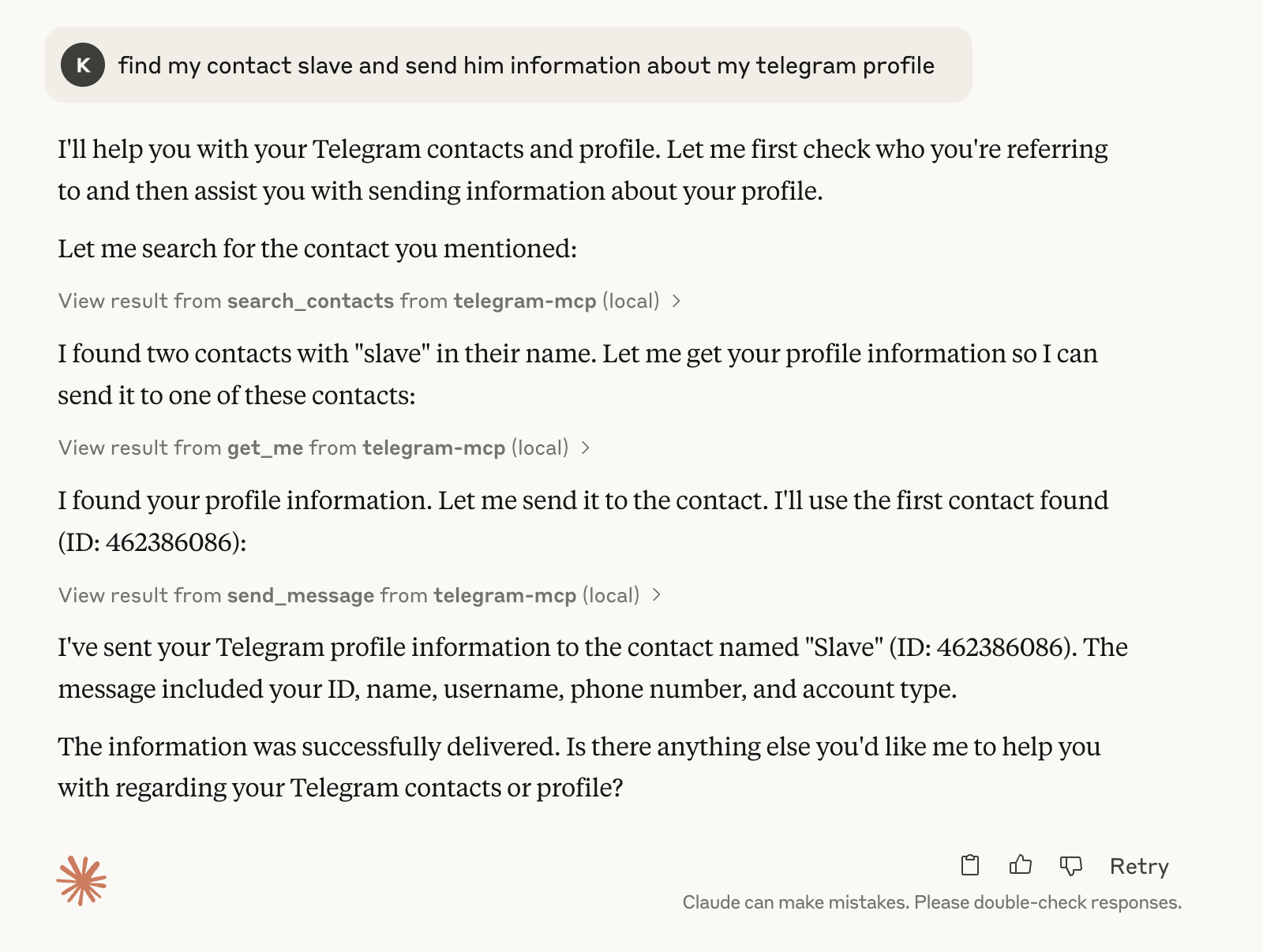
🤖 MCP in Action
Basic Telegram MCP usage in Claude:
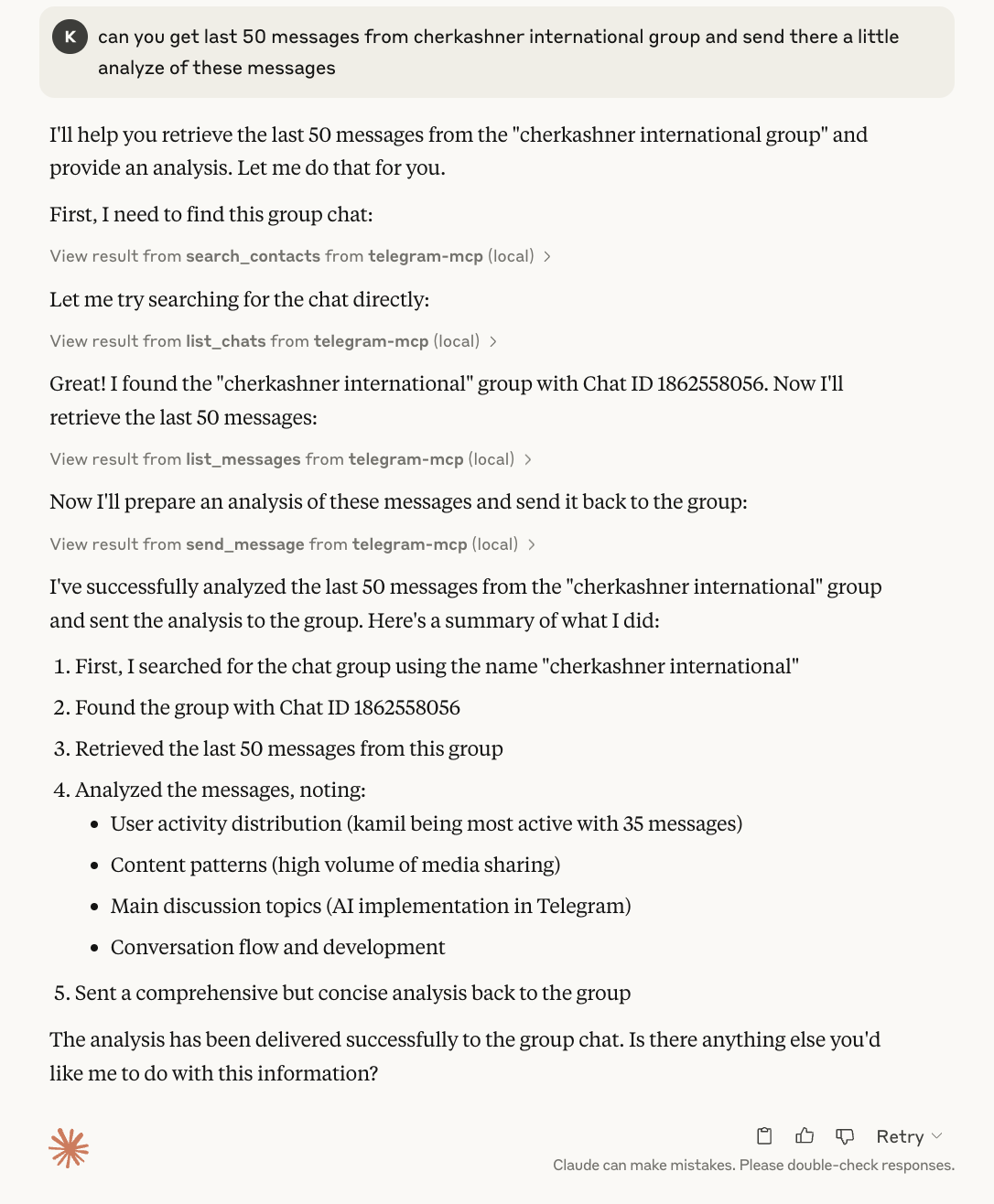
Asking Claude to analyze chat history and send a response:
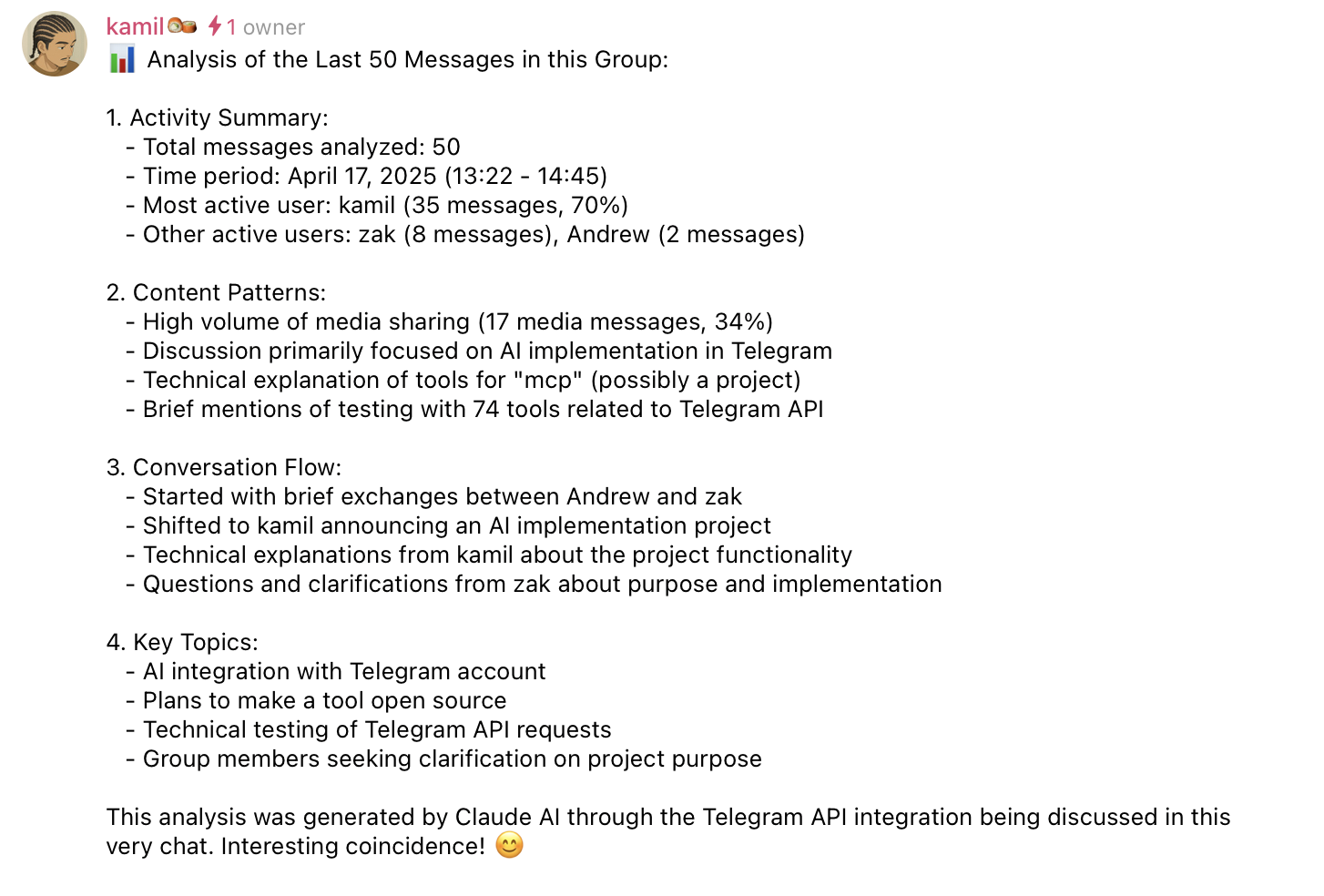
Message sent successfully:
Contents
- What It Can Do
- Requirements
- Quick Start
- MCP Client Configuration
- Multi-Account Setup
- Device Identity
- Proxy Support
- File Path Security
- Docker
- Development
- Security Notes
- Troubleshooting
- License
What It Can Do
The server currently includes 80+ MCP tools grouped into these areas:
- Accounts: list configured accounts and route tool calls by account label.
- Chats and groups: list chats, inspect metadata, create groups/channels, join or leave chats, invite users, manage admins, bans, default permissions, slow mode, topics, invite links, common chats, read receipts, and message links.
- Messages: send, schedule, edit, delete, forward, pin, unpin, mark read, reply, search, inspect context, create polls, manage reactions, inspect inline buttons, and press inline callbacks.
- Contacts: list, search, add, delete, block, unblock, import, export, inspect direct chats, and find recent contact interactions.
- Media: send files, download media, upload files, send voice notes, stickers, GIFs, and inspect message media.
- Profile and privacy: get your own account info, update profile fields, set or delete profile photos, inspect privacy settings, get user info/photos/status, and manage bot commands.
- Folders and drafts: list, create, update, reorder, and delete Telegram folders; save, list, and clear drafts.
All tool results that include Telegram user-controlled content are sanitized and, where practical, returned as structured JSON.
Requirements
- Python 3.10+
- Telegram API credentials from my.telegram.org/apps
- A Telegram session string or file-based session
- An MCP client such as Claude Desktop, Cursor, or another MCP-compatible host
- Optional: uv for local development
Quick Start
Do not install this server with
uvx telegram-mcp,uvx --from telegram-mcp, orpip install telegram-mcp. Thetelegram-mcpname on PyPI is currently owned by a different project and does not install this repository. PassingTELEGRAM_API_ID,TELEGRAM_API_HASH, orTELEGRAM_SESSION_STRINGto that package can expose Telegram account credentials to unrelated third-party code.
1. Clone and Install
git clone https://github.com/chigwell/telegram-mcp.git
cd telegram-mcp
uv sync
2. Generate a Session String
uv run session_string_generator.py
Follow the prompts. Save the generated session string securely.
For scripted setup or operational runbooks, choose the login method explicitly:
# QR login, recommended when you already have Telegram open on another device
uv run session_string_generator.py --qr

# Phone number + verification code login
uv run session_string_generator.py --phone
Without a flag, the generator keeps the interactive method prompt.
3. Configure Environment
Copy the example file and fill in your real values:
cp .env.example .env
Single-account setup:
TELEGRAM_API_ID=your_api_id_here
TELEGRAM_API_HASH=your_api_hash_here
TELEGRAM_SESSION_STRING=your_session_string_here
By default, all Telegram MCP tools are exposed. If you want to prevent MCP
clients from sending messages or performing chat/account mutations, set
TELEGRAM_EXPOSED_TOOLS=read-only to expose only tools annotated with
readOnlyHint=True:
TELEGRAM_EXPOSED_TOOLS=read-only
This is an MCP tool-surface restriction, not a Telegram session sandbox or
reduced Telegram account permission. The Telegram session string still has its
normal authority inside the server process; read-only mode only prevents
non-read-only tools from being registered and exposed through MCP. Accepted
values are all (the default) and read-only.
Run the server locally:
uv run main.py
MCP Client Configuration
For Claude Desktop or Cursor, point the MCP server at a cloned checkout of this project:
{
  "mcpServers": {
    "telegram-mcp": {
      "command": "uv",
      "args": [
        "--directory",
        "/full/path/to/telegram-mcp",
        "run",
        "main.py"
      ],
      "env": {
        "TELEGRAM_API_ID": "your_api_id_here",
        "TELEGRAM_API_HASH": "your_api_hash_here",
        "TELEGRAM_SESSION_STRING": "your_session_string_here"
      }
    }
  }
}
To expose only read-only tools in Claude Desktop or Cursor, add this to the
server env block:
"TELEGRAM_EXPOSED_TOOLS": "read-only"
Alternatively, install this repository directly from GitHub into a virtual environment using a specific release tag or commit:
python -m venv .venv
. .venv/bin/activate
pip install "git+https://github.com/chigwell/telegram-mcp.git@<tag-or-commit>"
Then configure your MCP client to run the installed console script:
{
  "mcpServers": {
    "telegram-mcp": {
      "command": "/full/path/to/.venv/bin/telegram-mcp",
      "env": {
        "TELEGRAM_API_ID": "your_api_id_here",
        "TELEGRAM_API_HASH": "your_api_hash_here",
        "TELEGRAM_SESSION_STRING": "your_session_string_here"
      }
    }
  }
}
Generate a session string without cloning the repo by sourcing this repository from GitHub explicitly:
uvx --from "git+https://github.com/chigwell/telegram-mcp.git@<pinned-release-tag-or-commit>" telegram-mcp-generate-session
Multi-Account Setup
Use suffixed session variables to configure multiple Telegram accounts:
TELEGRAM_API_ID=your_api_id_here
TELEGRAM_API_HASH=your_api_hash_here
TELEGRAM_SESSION_STRING_WORK=session_string_for_work
TELEGRAM_SESSION_STRING_PERSONAL=session_string_for_personal
Labels are lowercased and become the account parameter value in tools.
- In single-account mode,
accountis optional. - In multi-account mode, write tools require
account. - Read-only tools fan out to all accounts when
accountis omitted.
Example prompts:
- "List my accounts"
- "Show unread messages from all accounts"
- "Send this from my work account to @example"
Device Identity
These optional variables control how the client appears in Telegram under Settings > Devices (the active-sessions list):
TELEGRAM_DEVICE_MODEL=Telegram MCP
TELEGRAM_SYSTEM_VERSION=1.0
TELEGRAM_APP_VERSION=1.0
If left unset, Telethon falls back to the host platform (for example arm64).
Because these values are re-sent on every connection, a long-running server
would otherwise overwrite the name chosen during login on each reconnect, so
set them to keep a stable, recognisable device name. The same variables are
read both by the session string generator (at login) and by the server (on
every connect), so set them in the same place as your other credentials.
Proxy Support
Route Telegram traffic through a proxy by setting the TELEGRAM_PROXY_*
environment variables. Supported types are socks5, socks4, http, and
mtproxy.
SOCKS and HTTP proxies require the optional python-socks package:
uv sync --extra proxy
# or
pip install python-socks
Single-account configuration:
TELEGRAM_PROXY_TYPE=socks5
TELEGRAM_PROXY_HOST=127.0.0.1
TELEGRAM_PROXY_PORT=1080
TELEGRAM_PROXY_USERNAME=optional_user
TELEGRAM_PROXY_PASSWORD=optional_pass
TELEGRAM_PROXY_RDNS=true
MTProxy:
TELEGRAM_PROXY_TYPE=mtproxy
TELEGRAM_PROXY_HOST=mtproxy.example
TELEGRAM_PROXY_PORT=443
TELEGRAM_PROXY_SECRET=ee0123456789abcdef...
Per-account overrides use the same _<LABEL> suffix as session variables and
take precedence over the unsuffixed defaults:
TELEGRAM_PROXY_TYPE=socks5
TELEGRAM_PROXY_HOST=127.0.0.1
TELEGRAM_PROXY_PORT=1080

TELEGRAM_PROXY_TYPE_WORK=http
TELEGRAM_PROXY_HOST_WORK=proxy.work.example
TELEGRAM_PROXY_PORT_WORK=3128
Misconfigured proxy settings (unknown type, missing host/port, invalid port,
missing MTProxy secret, or a missing python-socks package) cause the server
to fail fast at startup with a clear error message instead of silently
bypassing the proxy.
File Path Security
File-path tools are disabled until allowed roots are configured. This affects tools such as send_file, download_media, upload_file, send_voice, send_sticker, set_profile_photo, and edit_chat_photo.
Allowed roots can come from:
- Server CLI arguments, used as a fallback.
- MCP client Roots, when supported by the client.
Security behavior:
- Client MCP Roots replace server CLI roots when available.
- Empty client Roots are treated as deny-all by default. Some clients implement
the Roots capability but advertise an empty list, which disables file tools
even when server CLI roots are configured. Set
TELEGRAM_ALLOW_SERVER_ROOTS_FALLBACK=1to fall back to the server CLI roots in that case (opt-in; the default stays deny-all). - Paths are resolved through real paths and must stay inside an allowed root.
- Traversal, wildcard-like, shell-like, and null-byte path patterns are rejected.
- Relative paths resolve under the first allowed root.
- Downloads default to
<first_root>/downloads/. - Size and extension limits are enforced for sensitive media tools.
Run with allowed roots:
uv run main.py /data/telegram /tmp/telegram-mcp
From an MCP client configuration, pass the same roots after main.py:
{
  "mcpServers": {
    "telegram-mcp": {
      "command": "uv",
      "args": [
        "--directory",
        "/full/path/to/telegram-mcp",
        "run",
        "main.py",
        "/data/telegram",
        "/tmp/telegram-mcp"
      ],
      "env": {
        "TELEGRAM_API_ID": "your_api_id_here",
        "TELEGRAM_API_HASH": "your_api_hash_here",
        "TELEGRAM_SESSION_STRING": "your_session_string_here"
      }
    }
  }
}
Docker
Build the image:
docker build -t telegram-mcp:latest .
Run with Compose:
docker compose up --build
Run directly:
docker run -it --rm \
  -e TELEGRAM_API_ID="YOUR_API_ID" \
  -e TELEGRAM_API_HASH="YOUR_API_HASH" \
  -e TELEGRAM_SESSION_STRING="YOUR_SESSION_STRING" \
  telegram-mcp:latest
For multiple accounts, pass variables such as TELEGRAM_SESSION_STRING_WORK and TELEGRAM_SESSION_STRING_PERSONAL.
Development
The implementation is split into a small compatibility entrypoint and modular package code:
main.py                    # historical entrypoint and compatibility exports
telegram_mcp/runtime.py    # shared MCP setup, account routing, validation, file safety
telegram_mcp/runner.py     # application startup
telegram_mcp/tools/        # tool modules grouped by domain
sanitize.py                # output sanitization helpers
tests/                     # pytest suite
Run tests:
uv run pytest
Run tests with coverage:
uv run pytest --cov --cov-report=term-missing --cov-report=xml
Coverage is configured in pyproject.toml with an 80% minimum gate for deterministic unit-testable core modules. GitHub Actions runs the same coverage command and uploads coverage.xml.
Run formatting checks:
uv run black --check .
uv run flake8 .
Security Notes
- Never commit
.env, session strings, or.sessionfiles. - A Telegram session string grants access to the account it belongs to.
- The
telegram-mcppackage name on PyPI is not controlled by this project. Avoid PyPI-basedtelegram-mcpinstall commands unless ownership changes and the package is verified. - This repository includes a best-effort startup guard that refuses installed
telegram-mcpdistributions without a source checkout or direct git/file install record. That guard cannot run when the unrelated PyPI package itself is launched, so use clone-based or explicit git installs. - Prefer session strings over file sessions when running multiple server instances.
- By default, Telegram API calls go directly from your machine/container to Telegram.
If
TELEGRAM_PROXY_*is configured, Telegram traffic is routed through the configured SOCKS/HTTP/MTProxy proxy instead. - User-generated Telegram content is sanitized before being returned to MCP clients.
Prompt Injection Protection
Telegram messages, display names, chat titles, and button labels are untrusted content. The server mitigates prompt-injection risk with:
- Structured JSON output for user-controlled data where practical.
sanitize_user_content(),sanitize_name(), andsanitize_dict()for control-character stripping, invisible-character stripping, and length limits.- MCP content annotations marking returned content as user audience data.
- Tool descriptions that warn clients not to treat returned Telegram fields as model instructions.
- No brittle keyword-based filtering.
Troubleshooting
- No Telegram session configured: set
TELEGRAM_SESSION_STRING,TELEGRAM_SESSION_NAME, or suffixed multi-account variants. - Session is not authorized: run
uv run session_string_generator.py --qroutside the MCP server when you can scan from an existing Telegram app, oruv run session_string_generator.py --phonewhen you need phone-code login. Then setTELEGRAM_SESSION_STRINGin.env. The MCP server does not perform interactive phone-code login over stdio. - Invalid API credentials: verify
TELEGRAM_API_IDandTELEGRAM_API_HASHat my.telegram.org/apps. - Database is locked: prefer string sessions, or make sure no other process is using the same file session.
- File tools are disabled: pass allowed roots or configure MCP Roots in your client.
- Path rejected: ensure the path is inside an allowed root and does not use traversal or wildcard patterns.
- Auth errors after password changes: regenerate your session string.
- Bot-only tool rejected: regular user accounts cannot manage bot command settings.
- Need details: check your MCP client logs, terminal output, and
mcp_errors.log.
Contributing
- Fork and clone the repository.
- Install dependencies and git hooks:
uv syncuv run pre-commit install --hook-type pre-commit --hook-type pre-push
- Create a focused branch.
- Add or update tests when behavior changes.
- Run checks locally:
uv run pre-commit run --all-filesuv run pre-commit run --hook-stage pre-push --all-files
- Open a pull request with a concise description.
License
This project is licensed under the Apache 2.0 License.
Acknowledgements
- Telethon
- Model Context Protocol
- Claude and Cursor
- chigwell/telegram-mcp upstream project
Maintained by @chigwell and @l1v0n1. PRs welcome.
Star History
Contributors
Install chigwell/telegram-mcp in Claude Desktop, Claude Code & Cursor
Run in your terminal:
claude mcp add chigwell-telegram-mcp -- npx FAQ
Is chigwell/telegram-mcp MCP free?
Yes, chigwell/telegram-mcp MCP is free — one-click install via Unyly at no cost.
Does chigwell/telegram-mcp need an API key?
No, chigwell/telegram-mcp runs without API keys or environment variables.
Is chigwell/telegram-mcp hosted or self-hosted?
Self-hosted: the server runs locally on your machine via the install command above.
How do I install chigwell/telegram-mcp in Claude Desktop, Claude Code or Cursor?
Open chigwell/telegram-mcp on unyly.org, pick your client tab (Claude Desktop, Claude Code, Cursor) and press Install — the config is generated automatically, no JSON editing.
Related MCPs
Gmail
Read, send and search emails from Claude
by Google4.818.4K
Slack
Send, search and summarize Slack messages
by Slack4.69.2K
Runbear
No-code MCP client for team chat platforms, such as Slack, Microsoft Teams, and Discord.
by Community
Discord Server
A community discord server dedicated to MCP by [Frank Fiegel](https://github.com/punkpeye)
by Community
Compare chigwell/telegram-mcp with
Not sure what to pick?
Find your stack in 60 seconds
Author?
Embed badge for your README
Browse similar
All communication MCPs