loading…
en/
Browse all
 by Anthropic
 by wenb1n-dev
 by madhurprashby modelcontextprotocol
jparkerweb/mcp-sqlite
FreeNot checkedModel Context Protocol (MCP) server that provides comprehensive SQLite database interaction capabilities.

About
Model Context Protocol (MCP) server that provides comprehensive SQLite database interaction capabilities.
README
This is a Model Context Protocol (MCP) server that provides comprehensive SQLite database interaction capabilities.

Maintained by
Features
- Complete CRUD operations (Create, Read, Update, Delete)
- Database exploration and introspection
- Execute custom SQL queries
Setup
Define the command in your IDE's MCP Server settings:
e.g. Cursor:
{
    "mcpServers": {
        "MCP SQLite Server": {
            "command": "npx",
            "args": [
                "-y",
                "mcp-sqlite",
                "<path-to-your-sqlite-database.db>"
            ]
        }
    }
}
e.g. VSCode:
{
    "servers": {
        "MCP SQLite Server": {
            "type": "stdio",
            "command": "npx",
            "args": [
                "-y",
                "mcp-sqlite",
                "<path-to-your-sqlite-database.db>"
            ]
        }
    }
}
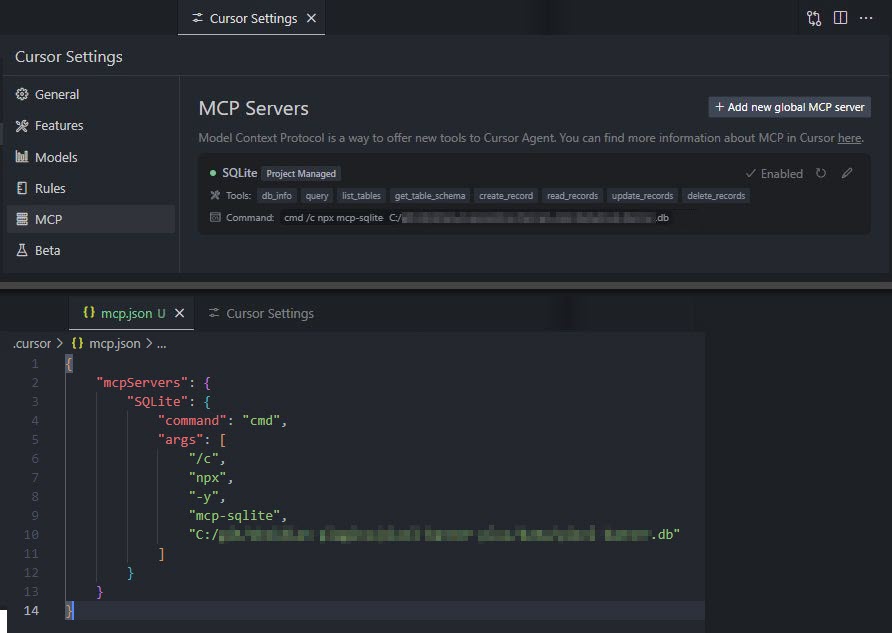
Your database path must be provided as an argument.
Available Tools
Database Information
db_info
Get detailed information about the connected database.
Example:
{
  "method": "tools/call",
  "params": {
    "name": "db_info",
    "arguments": {}
  }
}
list_tables
List all tables in the database.
Example:
{
  "method": "tools/call",
  "params": {
    "name": "list_tables",
    "arguments": {}
  }
}
get_table_schema
Get detailed information about a table's schema.
Parameters:
tableName(string): Name of the table
Example:
{
  "method": "tools/call",
  "params": {
    "name": "get_table_schema",
    "arguments": {
      "tableName": "users"
    }
  }
}
CRUD Operations
create_record
Insert a new record into a table.
Parameters:
table(string): Name of the tabledata(object): Record data as key-value pairs
Example:
{
  "method": "tools/call",
  "params": {
    "name": "create_record",
    "arguments": {
      "table": "users",
      "data": {
        "name": "John Doe",
        "email": "[email protected]",
        "age": 30
      }
    }
  }
}
read_records
Query records from a table with optional filtering.
Parameters:
table(string): Name of the tableconditions(object, optional): Filter conditions as key-value pairslimit(number, optional): Maximum number of records to returnoffset(number, optional): Number of records to skip
Example:
{
  "method": "tools/call",
  "params": {
    "name": "read_records",
    "arguments": {
      "table": "users",
      "conditions": {
        "age": 30
      },
      "limit": 10,
      "offset": 0
    }
  }
}
update_records
Update records in a table that match specified conditions.
Parameters:
table(string): Name of the tabledata(object): New values as key-value pairsconditions(object): Filter conditions as key-value pairs
Example:
{
  "method": "tools/call",
  "params": {
    "name": "update_records",
    "arguments": {
      "table": "users",
      "data": {
        "email": "[email protected]"
      },
      "conditions": {
        "id": 1
      }
    }
  }
}
delete_records
Delete records from a table that match specified conditions.
Parameters:
table(string): Name of the tableconditions(object): Filter conditions as key-value pairs
Example:
{
  "method": "tools/call",
  "params": {
    "name": "delete_records",
    "arguments": {
      "table": "users",
      "conditions": {
        "id": 1
      }
    }
  }
}
Custom Queries
query
Execute a custom SQL query against the connected SQLite database.
Parameters:
sql(string): The SQL query to executevalues(array, optional): Array of parameter values to use in the query
Example:
{
  "method": "tools/call",
  "params": {
    "name": "query",
    "arguments": {
      "sql": "SELECT * FROM users WHERE id = ?",
      "values": [1]
    }
  }
}
Built with
Appreciation
If you enjoy this library please consider sending me a tip to support my work 😀
🍵 tip me here
Install jparkerweb/mcp-sqlite in Claude Desktop, Claude Code & Cursor
Run in your terminal:
claude mcp add jparkerweb-mcp-sqlite -- npx FAQ
Is jparkerweb/mcp-sqlite MCP free?
Yes, jparkerweb/mcp-sqlite MCP is free — one-click install via Unyly at no cost.
Does jparkerweb/mcp-sqlite need an API key?
No, jparkerweb/mcp-sqlite runs without API keys or environment variables.
Is jparkerweb/mcp-sqlite hosted or self-hosted?
Self-hosted: the server runs locally on your machine via the install command above.
How do I install jparkerweb/mcp-sqlite in Claude Desktop, Claude Code or Cursor?
Open jparkerweb/mcp-sqlite on unyly.org, pick your client tab (Claude Desktop, Claude Code, Cursor) and press Install — the config is generated automatically, no JSON editing.
Related MCPs
Postgres
Query your database in natural language
by Anthropic4.822.3K
wenb1n-dev/SmartDB_MCP
A universal database MCP server supporting simultaneous connections to multiple databases. It provides tools for database operations, health analysis, SQL optim
by wenb1n-devPostgres Server
This server enables interaction with PostgreSQL databases through the Model Context Protocol, optimized for the AWS Bedrock AgentCore Runtime. It provides tools
by madhurprashPostgreSQL
Read-only database access with schema inspection.
by modelcontextprotocolCompare jparkerweb/mcp-sqlite with
Not sure what to pick?
Find your stack in 60 seconds
Author?
Embed badge for your README
Browse similar
All data MCPs